


mcdinner
-
Content Count
236 -
Joined
-
Last visited
-
Days Won
1
Posts posted by mcdinner
-
-
12 minutes ago, fxtec-preorder-47xx said:
Ok, if this does even make sense. (I think I could choose 'ignore signature' or something...)
Lets try!If you can upload this, I'll try.
If it does not work, I'll be going back to stock. (Mainly because this freaks me out:
)
I sent you a PM with download links. Hope it works somehow.
-
2 minutes ago, fxtec-preorder-47xx said:
Ok..., thanks anyway.
I won't build, I only got a i7-3667U with 8GB here, and I don't want to have that busy for some days and swapping? 🙂 or so... or even multiple tries...
With the probuilt images its still the same, just tried...
Anyway, perhaps someday the Lineage4MicroG-guys will provide a fitting boot img... or TWRP will... or whoever...Until then, I'm with plain LOS.
i7-6600U here and 20gb ram
first build was <24h and if you do not clean up the output an update is faster. Updating Git takes a while.
If you want I can give you my boot.img and you can test if it works for you installing the official builds. -
1 minute ago, fxtec-preorder-47xx said:
So then we would need your LIneage4Microg-build as well?
Those keys are just fitting those two? Nothing device specific, isnt it?As far as I understand you would need my builds i you don't want to lose any data.
I switched to building everything by my own with several packages included. If you have enough space left its easy to do, even if you have no idea what you are doing (look at me as proof)
Do the pre-built lineage4microg images still not work? -
-
1 hour ago, auvo.salmi said:
I just today morning shot a video for Fxtec support about this issue, and they promised to send me a new display. Quite fast response from their side!
Same here, they will send me a new display when they get new ones.
Also they asked me to send them the old one for investigation. I hope they can get money back from their supplier as this really looks like a production fault.
-
 4
4
-
-
On 9/8/2020 at 8:06 PM, PanicBrothers said:
I ordered in the past this:
https://a.aliexpress.com/_d8cjaSP
Fits perfect and all good.
Regards
Panic Brothers
did you buy the version with frame?
-
4 hours ago, EskeRahn said:
Yes, any good suggestions?
Hmm maybe something like "ghost touches and unresponsive area on lower screen.
Oh and for me touching the display in the upper half seems to help to reduce the ghost touches. But also the unresponsive are remains.
-
 1
1
-
 1
1
-
-
@EskeRahn Is it possible to rename the Thread? I think it would make sense to address the problem in the Title as there are a few people now with that problem.
-
8 hours ago, VaZso said:
However, I have noticed if I press the display at a certain corner, the self-working ghost touches seems to behave better...
Exactly the same here.
It happens for me when open or closed so i don't think its the cable.
After lying around the night the problem did not appear yet but the unresponsive 1cm area is still there, so its not completely gone. I think it will come back very soon.-
1
-
-
multiple displays with the error on the same location sounds like some production fault.
I'll write support an email when I'm back home. If they send me a new display and are ok with it I'll try to play around with the broken one a bit, applying heat or ice spray and see what happens.-
3
-
-
So, mine started having the same problem 30 minutes ago 😞
Same position as shown in the videos here in the thread and I also have it since beginning of January. It did not drop or bump anywhere, just started ghosting while typing on keyboard. Telegram just went nuts from one second to another... 😞
Addition what I noticed:
* there is a ~1cm area around "the line" where touch is not recognized right. If i move my finger slowly over it no touch is shown using developer settings showing touch* slight pressure while touching triggers the mass touches on the line much more often
* random touches also appear sometimes when not touching the display at all (as seen in other videos), happens mostly when using the keyboard (physical touching the device somewhere)
-
2
-
1
-
-
So, i just started from scratch and now it works like a charm. :)
-
3
-
-
8 hours ago, tdm said:
If you boot to the boot/recovery that you built (by using fastboot to flash it), you should have no signature issues with the package.
Just a guess, but perhaps the microg signature spoofing is getting in the way of the metadata signatures?
The easiest solution might be to fastboot flash your built images instead of using recovery to install them. You'll probably need boot, system, vbmeta, vendor. You can find them in out/target/product/pro1 under your build tree.
using my own boot image did the trick :) Install works smooth now, but after boot settings app and others just crash all the time and the system is not really working.
I deleted cache and userdata so I guess there is a problem with the build itself now
-
1
-
-
2 hours ago, tdm said:
If you boot to the boot/recovery that you built (by using fastboot to flash it), you should have no signature issues with the package.
Just a guess, but perhaps the microg signature spoofing is getting in the way of the metadata signatures?
The easiest solution might be to fastboot flash your built images instead of using recovery to install them. You'll probably need boot, system, vbmeta, vendor. You can find them in out/target/product/pro1 under your build tree.
Thanks for the hints, I'll start the build again as build artifacts got cleaned as I can see...
Add Thank you so much for all the work with Lineage!!
-
1
-
1
-
-
On 8/2/2020 at 8:13 PM, dicer said:
I am also building it myself. It is quite easy actually with the docker container: https://gist.github.com/dicer/3543ef27cbee845c0cbba9cf3f15242a
You just need a lot of RAM (I think 16GB?) and disk space (>100GB).
You won't get OTAs though. You will have to rebuild yourself once in a while
Regarding the boot image: You can just use the one from TDMs website as far as I know. There is also a way to extract them from the generated zip files but I forgot how, since you only need to do that once as a base. You install the boot image in slot A, boot to its recovery and install your self-compiled recovery/boot-image and system into slot B. After the next reboot, slot B will be selected and your self-compiled boot image will be used.
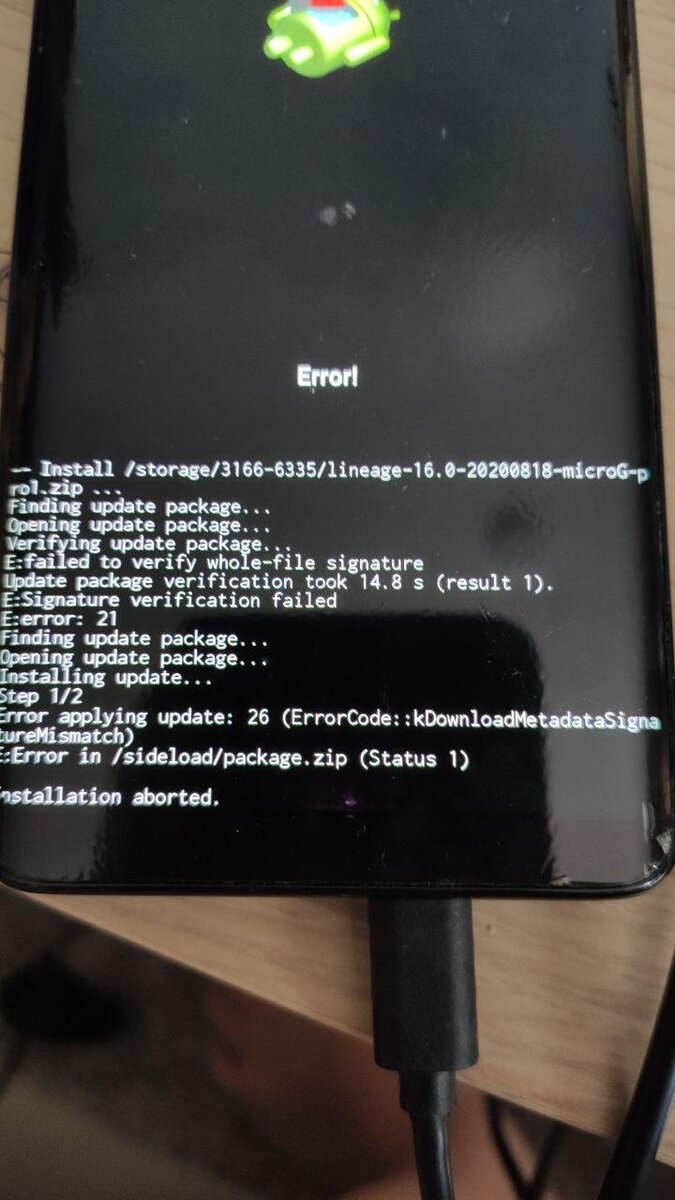
Thanks to you tutorial I managed to build lineage for microg but I have a problem installing it with lineage recovery and sideload.
After confirming to install with failed signature verification I get an error.
Happens with test recovery from tdm, official recovery and with official build microg and my own one.
Any Ideas what to do?
-
I can confirm crackling audio is gone on dialpad tones :)
-
1
-
2
-
-
a2dp works now with my earphones. :) thank you!
I'll try car connection tomorrow.-
2
-
-
34 minutes ago, tdm said:
test7 is up. This has some missing audio libs that should make audio behave better. Please test and let me know. a2dp is still broken but other bluetooth functions seem to be okay (tested file transfer). this will hopefully make [email protected] behave better.
Flashing right now. Hopefully it will help with audio and calls :)
-
Oh and I found something very strange in my logs but don't know if it is just a problem with matlog. Just look at the times the messages were logged.
2020-02-20-20-38-39.txt-
1
-
1
-
-
32 minutes ago, tdm said:
Been hacking on the lights HAL this morning (shhh, don't tell my wife). I think I've got the logic figured out so that the keyboard backlight always keeps the proper state (which is, on only when both the screen is on and the slider is out).
sounds promising :)
1 hour ago, tdm said:Thanks. So the issue isn't calling specifically but something in the audio stack that calling uses.
checked again, calling with telegram is not a problem but real calls are.
No BT or wired headset connected and not on speaker. Just receiving call and holding my hand in front of the proximity sensor to turn display on and off
Here Is a log for a call with the audio problem. 2020-02-20-20-59-26rec.txt-
1
-
1
-
-
@tdm After I got called today and audio was gone again, the tries after that were broken too.
yesterday my tests were all fine and id did several successful calls with display off and on a few times...
-
1
-
-
5 minutes ago, tdm said:
FYI .. I'm heading out of town shortly and won't be back until Monday. No new builds until then. I'll leave you with a Lineage splash that I made just for fun:
Flash this to the "splash" partition with fastboot. Here's the original in case you want to go back:
nice :)
have a good weekend-
1
-
-
10 minutes ago, tdm said:
Hmm, that is odd. When is the last time you checked GSM calling? The vendor update did not change much:
4 days ago. I did not bother to try because you did not mention fixing anything related, 2 days ago i received a call but used speaker as workaround.
14 minutes ago, tdm said:As for the clock, I haven't changed anything there. Qualcomm devices don't keep time between reboots, so time is fetched from the cell network or NTP at boot. But if the device was on the entire time, it should have kept time properly.
I retried again with a new alarm set 15 minutes back from now. After reboot it i get notification for 2 upcoming alarms (the morning and my test) and after a few seconds it switches to missed the test alarm. It seems to take a few seconds to get the wifi or network to get correct time.
After a few retries the testalarm started again. oO-
1
-
-
1 minute ago, tdm said:
I've done a bit of testing with SIP this morning because I haven't gotten voice working with my cell provider. Both inbound and outbound SIP calls seem to work fine. So any calling issues must be with the actual cell radio.
I checked gsm call and it seems to work now with test6. 😄 I'll check again tomorrow.
Something seems to be off with the clock.
I rebooted at ~19:40 and before putting in my sim pin my 7:20 morning alarm activated. Weird...
Also the last full charge from battery is 22 hours ago which is wrong because I started charging when i got to bed and it should not be more than 18 hours.
I can give you the logs if it helps.-
1
-
LineageOS, Current status : 16.0 Test Builds
in Support
Posted · Edited by mcdinner
indeed, infinite focus is blurry, but I have never used it before.
according to google this seems to be a common LOS problem on many devices