


jsreed5
-
Content Count
20 -
Joined
-
Days Won
12
Posts posted by jsreed5
-
-
On 12/15/2025 at 9:25 PM, jsreed5 said:
Yesterday I ordered what is apparently a replacement screen and digitizer for the Elephone U Pro from this Amazon link. Once it arrives, I'll test it with the Pro1 X directly, though I assume it'll need to be reflashed like all the others.
An update to this. My replacement Elephone U Pro screen arrived yesterday, but I didn't have a chance to install it until today. The screen is clearly secondhand; there was exposed, dirty adhesive on the back, and the plastic scratch protector on the front is also scuffed. The screen itself is largely undamaged. It came with several tools to help with replacement, including spudgers, adhesive strips, and two small screwdrivers (one Phillips and one flat).
The display frame was very easy to remove per F(x)tec's instructional video. It was a little more difficult to remove the screen from the display frame; I used a hair dryer to loosen the glue in one corner, then slowly pried it off the rest of the way. Then it was a simple matter of adding the new adhesive strips, setting in the new screen, and re-assembling.
Unfortunately, there are some black blobs on the corners of the screen, which was what I originally ordered a replacement screen to try take care of. It sounds like that's a common problem with replacement Elephone screens. However, between the time that I ordered the screen and it arrived, I dropped the Pro1 X again and the factory-installed screen failed entirely, so I needed this replacement anyway.
I was hoping I wouldn't need to flash this screen to deal with the touch-insensitive margin, but I will need to if I want true edge-to-edge input. As has been mentioned, if I put my finger within the margin and drag all the way to the edge, it works, but starting at the edge does not. To be honest, though, I'm debating if I even want to do it. Curved screens have always annoyed me--I tend to accidentally interact with things with my palm when I don't want to--and all the apps I normally use don't require input at the very edges.
-
 2
2
-
-
I've seen a few posts raising concerns about how much longer this community forum will be available. It seems F(x)tec is still in business, working on the Clicks keyboard case and other projects, but I don't know if there's a future for the Pro1 line. I've gained a lot of useful information from here, so as a precaution, I saved an offline copy of the forum over the weekend.
Specifically, the command I used to mirror the forum was:
wget -E -k -m -np -p https://community.fxtec.comThe archive is about 17 GB in total. Compressed as .tar.gz, it shrinks to about 2.3 GB, which I think is pretty manageable.
You can download the compressed copy directly from this Mega link or over BitTorrent via the following magnet link.
magnet?xt=urn:btih:b7530da843334b24e289cd5f165670f19cff356d&dn=community.fxtec.com_2025-12-27.tar.gz&tr=udp%3A%2F%2Ftracker.opentrackr.org%3A1337%2Fannounce&tr=udp%3A%2F%2Fopen.demonoid.ch%3A6969%2Fannounce&tr=udp%3A%2F%2Fopen.demonii.com%3A1337%2Fannounce&tr=udp%3A%2F%2Fopen.stealth.si%3A80%2Fannounce&tr=udp%3A%2F%2Ftracker.torrent.eu.org%3A451%2Fannounce&tr=udp%3A%2F%2Fexplodie.org%3A6969%2Fannounce&tr=udp%3A%2F%2Ftracker2.dler.org%3A80%2Fannounce&tr=udp%3A%2F%2Ftracker.tryhackx.org%3A6969%2Fannounce&tr=udp%3A%2F%2Ftracker.torrust-demo.com%3A6969%2Fannounce&tr=udp%3A%2F%2Ftracker.therarbg.to%3A6969%2Fannounce&tr=udp%3A%2F%2Ftracker.skynetcloud.site%3A6969%2Fannounce&tr=udp%3A%2F%2Ftracker.qu.ax%3A6969%2Fannounce&tr=udp%3A%2F%2Ftracker.hifimarket.in%3A2710%2Fannounce&tr=udp%3A%2F%2Ftracker.gmi.gd%3A6969%2Fannounce&tr=udp%3A%2F%2Ftracker.dler.org%3A6969%2Fannounce&tr=udp%3A%2F%2Ftracker.bittor.pw%3A1337%2Fannounce&tr=udp%3A%2F%2Ftracker.0x7c0.com%3A6969%2Fannounce&tr=udp%3A%2F%2Ftracker-udp.gbitt.info%3A80%2Fannounce&tr=udp%3A%2F%2Ftr4ck3r.duckdns.org%3A6969%2Fannounce&tr=udp%3A%2F%2Ft.overflow.biz%3A6969%2Fannounce&ws=https%3A%2F%2Fwebtorrent.io%2Ftorrents%2F-
 1
1
-
 4
4
-
-
On 12/22/2025 at 12:23 PM, Hook said:
@jsreed5 If you want to take a crack at getting it to work, I might be willing to send it to you to try. At that point you could buy it at a very cheap "parts only" price, or return it to me. DM me if interested.
Thank you very much for all of your effort. I'd be interested in giving it a try myself. I'll send a DM.
-
2
-
-
On 12/17/2025 at 3:24 AM, CornholioGSM said:
...change display and reflash is not too hard.
If you want then you can write me PM and i will help you 🙂
12 hours ago, Hook said:Let me test and I'll get right back to you. I have no interest in being paid to do this, just would like to help out someone in the US rather than having them have to deal with overseas shipping.
Thank you so much for your responses! The replacement screen I ordered is not here yet, but once it arrives, I'll test it just to confirm that it does in fact need reflashing.
@Hook If the test works with your AliExpress screens, I'll make arrangements over DM. I might even buy a second spare screen as a backup, if ou're willing to part with one. @CornholioGSM If it doesn't work, I'll reach out via DM.
-
1
-
-
I have a black semicircular blob on the bottom corner of my Pro1 X screen due to drop damage. Fortunately, it doesn't block any important parts of the screen just yet, but it's slowly getting bigger over time.
Yesterday I ordered what is apparently a replacement screen and digitizer for the Elephone U Pro from this Amazon link. Once it arrives, I'll test it with the Pro1 X directly, though I assume it'll need to be reflashed like all the others.
Is anyone still offering this service? I live in the US, which might make things tough, but I'm willing to cover any shipping and import fees as needed.
Edit: fix autocorrect
-
1
-
-
I recently successfully updated my Pro1 X to LineageOS 23, starting on 2025-12-08 nightly. When I updated, I installed Magisk as a zip after flashing the image.
Today I successfully updated to 2025-12-15 nightly using OTA. After installing the OTA update, I always re-install Magisk to the inactive slot before rebooting. Is that still necessary to maintain root?
-
9 hours ago, Hook said:
Switch the Physical Keyboard language in Settings/System/Keyboard/Physical Keyboard/Builtin Keyboard from "English (US)" to "F(x)Tec QWERTY"
Thank you, this is exactly what I needed! I didn't realize I had to tap into the "English (US)" option to get different keyboard layouts.
-
I have updated my Pro1 X to official LineageOS 21 with root.
My only problem with the update is that my keyboard mapping seems to have changed slightly. On LOS 20, my key mappings matched what was printed on the physical keys. Now they more closely match a standard en-US keyboard: I get a semicolon (;) where the key says question mark (?), I get a question mark where the key says pipe (|), and I cannot get a pipe at all. This severely limits the functionality of terminal emulators such as Termux, which I use regularly. Does anyone know of a fix for this issue?
-
My Pro1 X just arrived about half an hour ago. Luckily, my device doesn't have a depleted battery, but it came out of the box at around 10 to 15 percent. I'm guessing some units were close to dying when F(x)tec checked them, and they fully ran out during transit.
-
2
-
-
It's finally happening! Just got a notification from IGG that my perk has shipped, with a USPS tracking number (I'm in the United States).
-
3
-
1
-
-
I've moved to a new address between the last update and now. When I saw the most recent update, I sent a e-mail to F(x)tec asking if I could have my shipping address changed. Interestingly, they responded and changed the address very quickly, and I even got a message from Indiegogo that the shipping address on my order was updated.
I mention this because I've heard people on IGG claim that they couldn't change their shipping addresses with F(x)tec. The fact that I could do it quickly feels like an indication--albeit a small one--that they genuinely are hopeful things will work out this time.-
6
-
-
9 hours ago, EskeRahn said:
What they are now sending is the 8/256GB Blue QWERTY-EN,
So those of us with more rare choices (like my Scandinavian keyboard) will have to wait further, despite having a number way below 568.That's good news for me; it's the exact model I ordered.
The bad news? My ID is 1874. No dice on this allotment.
It does make me wonder, though: might I (and others who ordered that version) be prioritized in the next contributor batch as well?
-
1
-
-
I ordered via the IGG campaign (#1874) and purchased the pre-early bird 256 GB perk, with a QWERTY keyboard, no engraving, and switched from LineageOS to Android. I am located in the US.
It appears some orders from batch 1 are arriving in the US now. I haven't inquired as to what batch my order is in, but I have not yet received a shipping notification, so I assume mine is not in batch 1.
That being said, the number of confirmed orders I'm seeing is rather small for a 707-unit batch. It's possible that my order is indeed in batch 1 and it's simply shipping slowly. If that's the case, I hope the slow dispatch of batch 1 it doesn't impact the timing of shipments from batch 2.
-
I believe there was a thread at one point where people would post their order number for the original Pro1, the country their order was shipping to, and when they got a shipping notification for the device. This allowed people to infer information about the order of shipping.
Does that thread still exist? If so, we might start using it once we get notifications, or start posting such information here.
-
1
-
-
16 hours ago, Fullmetaljacket223 said:
So something I've been wondering, but entirely unable to answer, is it feasible on the Astro to type with thumbs like a standard qwerty side sliding phone, or is it mostly only comfortable to use like a laptop keyboard? Looking at the size and shape of the keys, it is hard for me to imagine typing on it like you would with the Pro1-X would be comfortable or easy.
I own the Gemini PDA, a predecessor to the Astro which was also made by Planet Computers and that has a similarly-sized keyboard. I have relatively short and stubby thumbs, and I find it somewhat difficult to type on the Gemini using only my thumbs. For me, it's much easier to set the Gemini down on a flat surface and type as I would on a regualr keyboard.
I do not own a Pro1 but am slated to receive a Pro1 X. I can give a more detailed comparison of the two devices once the Pro1 X arrives.
-
3
-
-
I don't own the Cosmo Communicator, but I do own its predecessor, the Gemini PDA. The 4G model of the Gemini can be used as a phone, but it's really not designed to be a phone--it has no outer screen and is essentially built around its keyboard.
I bought the WiFi-only model of the Gemini PDA knowing that I had no intention to use it as a phone; I always intended to buy the Pro1 / Pro1 X or a device like it to use as an actual phone. To that end, I installed Debian Linux on the Gemini and use it as a full Linunx UMPC.
The Gemini is now 5 years old and is definitely showing its age. It doesn't get updates anymore and its processor can't handle very strenuous tasks of any kind. But it's more than usable as a daily driver for things like light coding and everyday Internet tasks. I even took it and a full-size laptop on a business trip a few years ago, and I ended up using the Gemini over the full-size laptop exclusively. The keyboard is surprisingly comfortable for being so small, and with some tweaks and customizations, it works just as well as any Linux desktop.
From skimming the OESF forums, it appears the Cosmo can also run Debian. If I were to buy one, I'd keep the Pro1 as my Android device and use the Cosmo as a full UMPC.
-
1
-
2
-
-
33 minutes ago, marmistrz said:
I remember reading somewhere that the Pro1x was supposed to have a massive camera upgrade (to a 48MP sensor) but I can't find it on fxtec.com. Was the plan eventually abandoned?
The first mention of an upgraded camera sensor was in F(x)tec's February 2021 update on IGG, the same update in which the SD662 chipset was revealed.
QuoteWe are upgrading the camera module to the latest 48MP Sony IMX586 Sensor to take advantage of the Snapdragon 662’s support for larger camera sensors.
F(x)tec appear to have come through with this. The first image of the new sensor was in their June 2021 update.
QuoteThe new 48MP camera module has arrived and is ready to tune.

Mentioned again in their August 2021 update, and most recently in their October 2021 update:
QuoteThe new IMX586 camera module is now fully functioning, with the autofocus and flashlight fully refined for capturing the perfect pic!
QuoteDespite the global shortage and delays regarding a lot of electronic components and chipsets this year, we have secured all the necessary components required to begin production. This includes the Qualcomm SoC parts, camera sensor, screen (which are currently in short supply).
As final assembly is beginning now, I assume it's safe to say they have all the sensors now, and they will be included with the Pro1 X.
-
2
-
-
I'm located in the central United States, near the Kansas City region.
-
2
-
-
November 2020 backer of the Pro1-X and first-time poster here.
F(x)Tec's February update on IGG says they are due to start manufacturing when Shiyan, in the Bao'an district of Shenzhen, "come[s] out of covid lockdown next week." I found this post on Baidu (in Chinese) stating that many restrictions in Shiyan were being lifted on 20 February, now two days ago.
I think the speculation that the February update was written in relation to last week is correct. It's also possible that F(x)Tec really was expecting restrictions to be lifted next week, and it turned out they were lifted early. If either of these scenarios is true, then F(x)Tec might indeed start manufacturing phones this week.
Having said that, I don't know exactly where the facility is in Shiyan, and it's possible that particular facility is still facing a lockdown.
Edits: clarification
-
7
-
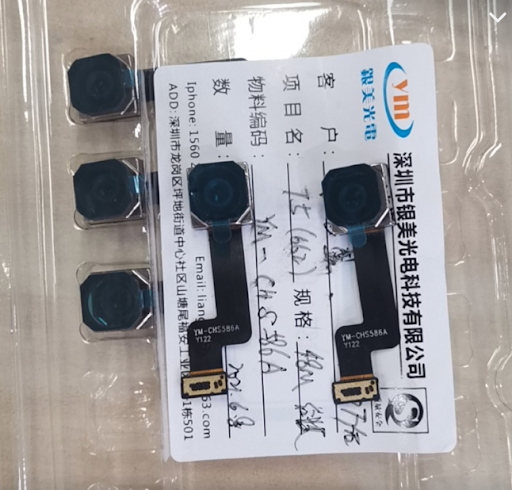
Pro1x Screen Repair (Using Dummy Pro1) Service?
in General Discussion
Posted
One more update, with apologies for the triple-post.
I received a secondhand original Pro1 in the mail from the indefatigable @Hook. Using the official flashing guide from this thread, I updated the Pro1 to firmware 20200825 and re-ran the initial setup process (including a one-time factory reset). The Pro1 was confirmed to be working normally. However, when I unplugged the original Pro1 screen frame and plugged in my Pro1 X screen frame (with the replacement Elephone screen attached), the Pro1 immediately entered a boot loop.
I then went back to the guide and reflashed all the firmware partitions again. The Pro1 booted normally again afterward. I went through the initial setup process again and moved the screen frame back to my Pro1 X. Voilà, a fully working Pro1 X screen with no touch-insensitive borders!
I don't know what part of the firmware files did the trick. I'm not even sure they actually changed anything about the screen--it could be the boot loop was completely coincidental. Either way, I have a fully functioning screen again, a few spares, and peace of mind that I can keep this phone working for a while yet.
Now that I know this process works, I'll offer this service to others. If you provide me an unflashed replacement screen for your Pro1 X and a paid return label for it, I'll update it and send it back to you for no futher cost. In the meantime, if you have both a Pro1 and and Pro1 X, I hope this information is helpful.