


SteffenWi
-
Content Count
141 -
Joined
-
Last visited
Posts posted by SteffenWi
-
-
So I've finally started using my Pro1, running with MicroG for Lineage distribution and I'm pretty happy with the phone except for one thing: The audio quality during phone calls is bad.
- People I call hear static/buzzing all the time unless I switch to hands-free mode - make of that what you will, I don't get it.
- During a call - without either party moving - the audio quality switches from 'normal' to 'muffled' and back again all the time. This happens both with Wifi calls (and me sitting right next to the router) and 4G calls. Since 3G has been switched off in Germany I can't test WCDMA and I don't have GSM reception where I live, only LTE. Or at least the phone doesn't pick up any signal beside LTE.
Is there a way to test the 'bottom' microphone when not in a call? Audio recorders seem to pick up the microphone on the back which is also used in hands-free mode, I guess?
-
On 4/4/2021 at 12:00 AM, mibry said:
- download the ut tweak tool
- open the app and select system
- change the file system to read/write this time only
aaand that was one of the parts I was missing. Thank you.
@claude0001 ah. To be fair I didn't see the adb push thing. But the first way doesn't work [quote]Connect the UBports device and the PC with a USB cable. Then copy the file using your file-manager.[/quote] because the device isn't recognized - I think I described that before.
-
@mibry I don't understand how to apply that fix. I can't edit those files from a terminal on the device, I can't ssh into Ubuntu Touch when it is running because no ssh service is running, I can't just copy files via USB because the device isn't recognized correctly and when I boot into recovery and connect via adb shell after mounting the filesystem, I can see all the files in /system_root but I can't execute vim.tiny to change anything.
Oh and I can't set up a SSH server in Ubuntu Touch because I would have to copy my public key over aaand as I said I can't copy any files.
-
11 hours ago, mibry said:
There is a fix available, the error is because make dev needs to be removed during install. I tested an install and got libertine installed.
uhm, could you post that fix? Because I couldn't find anything (useful) when I searched for that error.
-
@mibry I can install a Ubuntu Xenial Xerus container, however I can't install any packages. During the installation the log spits out a bunch of
mknod: fb0-: Permission denied
makedev fb0 c29 0 root video 0660: failed
messages and then ends with
rm: cannot remove /dev/sde16: Permission deniedand a general error that the installation process failed.
Also see my previous post as I found two more issues. -
On 3/18/2021 at 12:17 AM, mibry said:
Try and re-install the offical android image then installed ubtouch. I also found the the latest installer didn’t work correctly, I had success with the installer version 0.54 on windows.
Surprisingly, this worked. Thank you!
I first flashed the original image as described here ->
And then I installed uboot-installer 0.54-beta by cloning the repository and checking out this branch here and then runningnpm install npm startThe first attempt failed as the Pro1 wouldn't boot into recovery mode, but after restarting the phone, exiting the installer, going back to the boot menu and restarting the installer it worked. It just took a long time before I got into the start menu.
@Raksura pinging you here as you had a detailed list of what worked and what didn't.
- GPS now works.
- Flashlight works in the camera app and the application "uTorch" which I installed from the OpenStore. It does not work when using the flashlight switch in the pull-down menu.
- Keyboard backlight still doesn't work
-
No indication wether the device is charging or not. Also no access to the phone's filesystem from my computer.
lsusbreports0fce:7169 Sony Ericsson Mobile Communications AB Unknown
I did not test anything related to GSM/UMTS/HSDPA/LTE.
My next step will be to see if I can get the german keyboard to properly work and not be shifted.
-
 3
3
-
54 minutes ago, suicidal_orange said:
I'm very interested in SteffenWi's findings when they get it working (hoping the power of positive thinking helps!)
I tried flashing stable at first and now edge, both with the same result of the phone not booting. If anyone has any experience with Ubuntu Touch and is able and willing to help, this is what I can see in the /cache/ubuntu_updater.log file after waiting for 10 minutes for the device to start and then rebooting it into recovery mode:
A/B slot system detected! Slot suffix is _b

Formating: system

system partition: /dev/block/bootdevice/by-name/system-b

umount /system_root: Invalid argument

mke2fs 1.43.3 /04-Sep-2016)

Discarding device blocks:   4096/786432??????????????????????????????????????????????????????????????????done

[...]bunch of stuff about creating filesystem and superblocks[...]

umount /dev/block/sda7: Invalid argument

umount /cache/system: Invalid argument

umount/system_root: Invalid argument

e2fsck 1.43.3 (04-Sep-2016)

Pass 1: Checking inodes, blocks and sizes

Pass 2: Checking directory structure

Pass 3: Checking directory connectivity

Pass 4: Checking reference counts

Pass 5: Checking group summary information

/dev/block/bootdevice/by-name/system_b 11/196608 files (0.0% non-contiguous), 29884/786432 blocks

Formating: data

Applying update ubports-<alphanumeric number>.tar.xz

mv: bad 'data/*': No such file or directory

Applying update device-<alphanumeric number>.tar.xz

mv: bad 'data/*': No such file or directory

Applying update boot-<alphanumeric number>.tar.xz

mv: bad 'data/*': No such file or directory

Flashing boot at /Dev/block/bootdevice/by-name/boot_b

Applying update: keyring-<alphanumeric number>.tar.xz

mv: bad 'data/*': No such file or directory

Applying update: version 286.tar.xz

mv: bad 'data/*': No such file or directory
Seems to me like the supplied image is bugged.
-
 1
1
-
-
I noticed something on the screenshot I took - from which I posted the small snippet above - which is the small selection box at the bottom of the installer screen.
In there it lists all available images, including the FxTec Pro / Pro-X image (as feared they seem to have consolidated the two, which could mean that going forward only the Pro-X will be supported).
After selecting the entry from that list I was able to install Ubuntu Touch on the Pro1.*edit*
It doesn't boot. I can still get into the recovery mode and the boot manager but I can't start Ubuntu Touch.
-
5 hours ago, claude0001 said:
For the Pro1, the Ubuntu port was a community effort, not led by FxTec. So it was (hopefully: is) "supported" (to some degree) by the OS, but not in the company sense of the word. With the Pro1-X this may change
How though? FxTec's effort is focused on the Pro1-X. Not the Pro1.
Also this guy says that the port was done by FxTec, not by the Ubuntu Touch community. -
@claude0001 let's talk about this here in the appropirate thread.
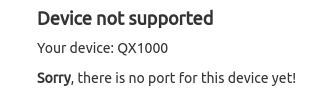
The screenshot/snippet I posted was from the ubports-installer and it clearly shows that installation is not possible/supported.
The installation method detailed in this thread is sketchy at best. It requires TWRP when TWRP isn't available for the Pro1 as detailed by this thread ->
-
Let's talk about that in the Ubuntu Touch thread. I pinged you there.
-
*edit* this post was previously posted over here ->
What does this mean for Ubuntu Touch on the original Pro1? As of now it isn't possible to install it and the Pro1 shows up as not supported. I've seen some people having managed to install it, I'm guessing those were Ubuntu Touch developers.

-
21 hours ago, tdm said:
Setting aside that /e/ is basically a rip-off of LineageOS, the TWRP referenced in the Sailfish thread should work for this purpose. If not, perhaps @Sean McCreary or another developer can help. I simply don't have the time or desire to build TWRP right now.
Hey that's fine 🙂 I didn't know you were (again 😉 ) the only one to work on it.
As for /e/ - I find it unfair of you to call it a 'rip-off'. For one you can't "rip-off" an open-source project [unless you talk about violating the license covering it]. You fork it. Which is what /e/ is. A fork. With a lot of stuff that, a few years ago, were in LineageOS/CyanogenMod. All of which was removed from LineageOS over time. Default, built-in root? Removed. Ability to fake or obfuscate geolocation? Removed. On top of all of that, /e/ is an actual no-google-spy stuff distribution.-
1
-
-
On 1/6/2021 at 1:23 AM, tdm said:
I've been quite busy with other things lately. Why do you need it, and why won't the existing one (the one used for sailfish install) work?
Hey, hope you had a couple nice days and a happy new year 😉
I need it to be able to flash /e/ as it seems. When I try to flash from a LineageOS recovery iso I get a weird error. Apparently that doesn't happen with TWRP.
-
Is there any update on TWRP? What is needed for it to work on the pro1? I kinda need it apparently.
-
1
-
1
-
-
huh, my last information was that TWRP didn't work with the Pro1 due to A/B stuff and encryption? I'll look into this, thank you! @Jeremiah Cornelius
I wasn't using TWRP initially. I was using the LineageOS ROM.
-
Hi again,
/e/ is based on LineageOS so it should work. Did anyone give it a try?
I tried compiling it myself but the resulting .zip file isn't flashable. I'm receiving
Error applying update: 26 (ErrorCode : : kDownloadMetadataSignatureMismatch)when I try to sideload the .zip file. Guessing something went wrong during the compilation, but no error was reported. Wondered if anyone might have had more luck.
-
So, I got my phone back a few weeks ago and it was my fault all along. Apparently some metal thingi got stuck at the bottom of the USB port and the tech had to dig that out. Their best guess is that it came from a USB cable. I checked the fxtec cable, which was fine, and two cabls I tried after the phone wouldn't connect anymore. None of them have damages I can detect - then again, I didn't find that metal piece either.
Advice to anyone having a similar problem: Be thorough when checking the USB port.
-
1
-
1
-
-
@TeZtdevice nope. haven't.
-
@Serolfic hey , did you get your phone back yet? I'm having a similiar problem where my phone has now been in repair for >6 weeks and nearly 4 weeks ago I got an info from support telling me it would be done in 'two weeks' and since then I haven't heared anything. They aren't responding to my pleas for an update on the situation either.
-
Months ago my Pro1's USB port decided to stop working after less than 100 connect/disconnects (I had barely used the device because the software was just nowhere near what I deemed 'ready for daily use'). Due to some issues it took me a while to send the phone to FxTec and now it has been lieing there for 6 weeks. So @DieBruine's decision to repair the phone herself was the right choice.
*Edit* To anyone reading this: the USB port was fine. A piece of metal got stuck at the bottom of the port. Support fixed it. Also I should get my eyes checked. Probably.
-
 1
1
-
-
Just now, EskeRahn said:
Except the storage option
okay, yes, fair point. You can get a version with 2GB more RAM and double the memory capacity.
In any case, I would've hoped for more. Wireless charging for example (hint: my Pro1 is still in repair due to the broken USB C port.), a slightly bigger battery and a newer CPU (-> energy efficiency) and a fingerprint sensor on the back of the phone where it belongs.
-
1
-
-
Am I missing something here? The tech stats for the Pro1-X are the exact same as for the Pro1. Is this a relaunch? Same CPU, same RAM, same screen, same camera, same (shitty) spot to put a fingerprint sensor at.
-
1:50 pm has come and passed without any email. Now what? Or are we playing Timezone bingo here?
-
 1
1
-
Poor call audio quality on Pro1?
in Pro1 - Thoughts & questions
Posted · Edited by SteffenWi
@Rob. S. eh, it's not just Telekom. The entire 3G network is being shut off in Germany in favour of 4G/5G. See -> https://www.computerbase.de/2021-06/3g-abschaltung-telekom-vodafone-telefonica/ (German article with rough time estimates). And yes, in my apartment/house you don't get GSM reception.
I'm not so sure about it. The speaker works fine for me most of the time, it's just sometimes the audio switches to muffled for some reason, but that also happens when I make the call via Wifi. While standing next to the router.
I'm not sure what causes the buzzing/static on the receiving end of the call. I don't think it's the modem or else I would also have the static in hands-free mode. Also the static should disappear in that case when I make a call via Wifi.